CPU Fan Error on Boot: What It Means and How to Fix It
Seeing CPU Fan Error or CPU fan speed detection error at boot? What triggers it, how to fix it on ASUS, MSI and Gigabyte, and when Ignore is safe.
PC troubleshooting starts with one question: what changed? A system that ran fine yesterday and crashes today changed something — a driver, a temperature, a Windows update, a setting in BIOS, or a part that’s slowly failing. This category covers the diagnosis side of PC ownership: post-failure debug codes, motherboard status LEDs, GPU temperatures that hint at fan failure versus airflow issues, CPU thermal behavior, and the white-light-on-motherboard symptom that means something specific on every brand. Each guide assumes you don’t want a generic checklist — you want to know what your symptom actually means, what the most likely cause is, and how to confirm it before you start swapping parts. Where temperatures are involved, articles include the safe ranges, the throttling thresholds, and the danger zones for the specific GPU and CPU generations covered. The goal is not “try this and see” — the goal is to narrow down the cause before touching the hardware. For boot-stage failures, check our BIOS Settings guides; for thermal problems, see Cooling & Airflow; for component identification, see Hardware Guides.
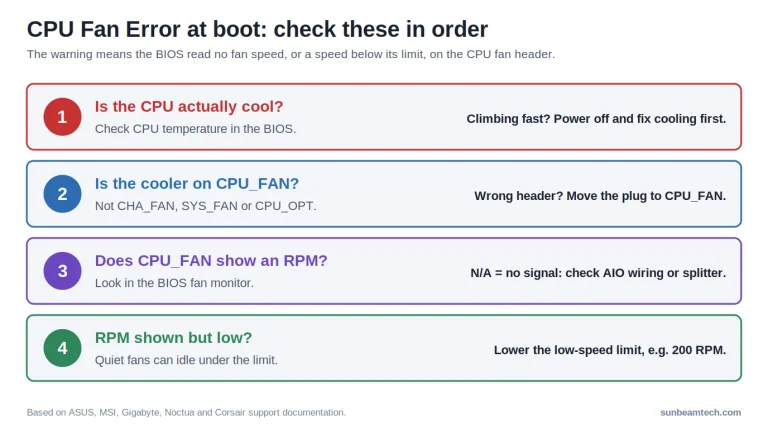
Seeing CPU Fan Error or CPU fan speed detection error at boot? What triggers it, how to fix it on ASUS, MSI and Gigabyte, and when Ignore is safe.
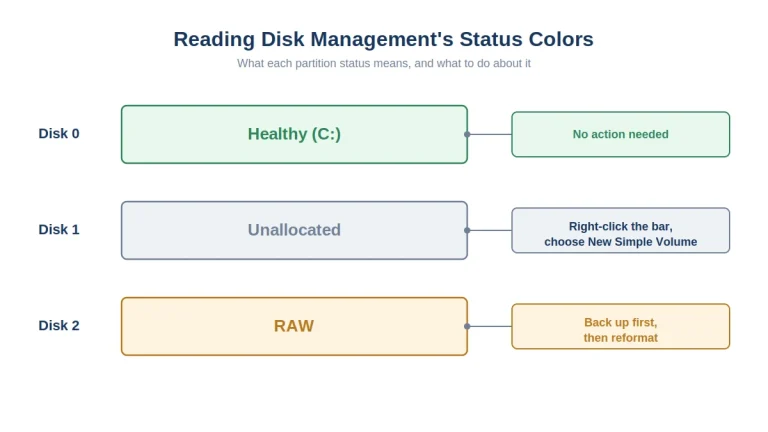
An external hard drive not showing up almost always means a connection, driver, or drive-letter problem rather than dead hardware, and it’s fixable in under ten minutes in most cases. Last updated: September 2026 You plug the drive in. Nothing shows up in File Explorer. No icon, no drive letter, nothing on the desktop either…

Windows has no built-in CPU temperature readout. The two reliable ways to see it are your motherboard’s BIOS screen, which needs nothing installed, and a free monitoring tool. Graphics card temperature is different: that one Windows does show you. Last updated: September 2026 The Short Answer Nothing installed, right now: restart, enter the BIOS, and…

A PC that won’t turn on after a power outage has typically experienced residual dirty power in its capacitors, a tripped surge protector, BIOS/CMOS corruption, or physical hardware damage from a voltage spike. Last updated: September 2026 Quick Answer: Why Won’t My PC Turn On After a Power Outage? Most of the time, a PC…

A case fan that lights up but won’t spin has power to its RGB circuit but no signal or voltage reaching its motor, caused by a disconnected header, BIOS fan curve, or failed bearing. Last updated: August 2026 Quick Answer: Why Is My Case Fan Not Spinning but the Light Works? Your case fan’s RGB…

The EZ Debug LED is a row of diagnostic indicators on MSI motherboards that lights solid during POST to identify which component, CPU, DRAM, VGA, or BOOT, is preventing the system from starting. Last updated: August 2026 Quick Answer: What Does the EZ Debug LED CPU Light Mean? A solid EZ Debug LED on CPU…

When a PC powers on but shows no display, the system is receiving power but failing POST or failing to send a video signal to the monitor. Last updated: August 2026 Quick Answer: Why Is My PC’s Power Light On But Nothing Shows on Screen? Your PC’s power light being on only confirms the PSU’s…

Motherboard HDMI not working is typically caused by a CPU without integrated graphics, a disabled iGPU in BIOS, a dedicated GPU overriding the onboard output, or a faulty HDMI cable or port. Last updated: July 2026 Quick Answer: Why Is My Motherboard HDMI Not Working? The single most common reason your motherboard’s HDMI port produces…
A PC fan gets loud when it spins faster to compensate for excess heat, blocked airflow, or a mechanical fault that pushes fan RPM beyond its quiet operating range. Last updated: July 2026 Quick Answer: Why Is My PC Fan So Loud? The most common reasons a PC fan runs loud are dust clogging airflow,…

The DRAM light on a motherboard is a POST debug LED that illuminates when the system cannot detect, initialize, or communicate with installed RAM modules. Last updated: July 2026 Quick Answer: What Does the DRAM Light Mean on a Motherboard? A lit DRAM debug LED means your motherboard failed to complete memory initialization during POST…
Independent PC hardware guides written by builders, for builders. No sponsored rankings, no affiliate bias — just straightforward advice to help you make better decisions about your next build.