Best Low Profile CPU Coolers in 2026: Picks by Height for ITX and Slim Cases
Low profile CPU coolers from 37 to 77 mm, picked by how much room your case has, with independent test data and the RAM and socket checks to do first.
PC cooling is the difference between a system that holds boost clocks under sustained load and one that thermal-throttles three minutes into a game. This category covers the full cooling stack: air coolers, AIO liquid coolers, custom open loops, case fans, thermal paste, fan curves, and the airflow patterns that tie everything together. The goal isn’t lowest possible temperatures — it’s stable temperatures matched to your CPU, your GPU, your case, and the workload you actually run. A Ryzen 9 in a 240mm AIO is overkill for office work and underbuilt for sustained rendering. A high-end air cooler can match many AIOs at half the price with none of the failure modes. The articles here include thermal paste reviews with real conductivity numbers, custom loop guides that explain pump and reservoir choice without the cult-of-watercooling marketing, AIO comparisons, and airflow setups for cases that ship with bad fan configurations from the factory. For the parts you’re cooling, see our Hardware Guides when temperatures cross safe ranges, see Troubleshooting.
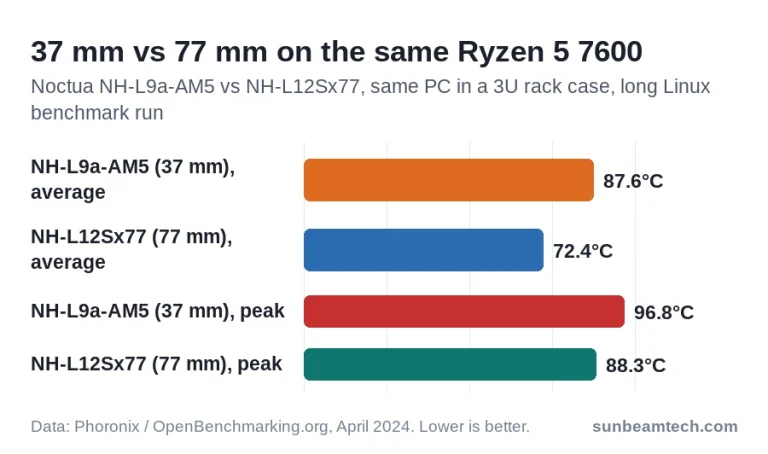
Low profile CPU coolers from 37 to 77 mm, picked by how much room your case has, with independent test data and the RAM and socket checks to do first.
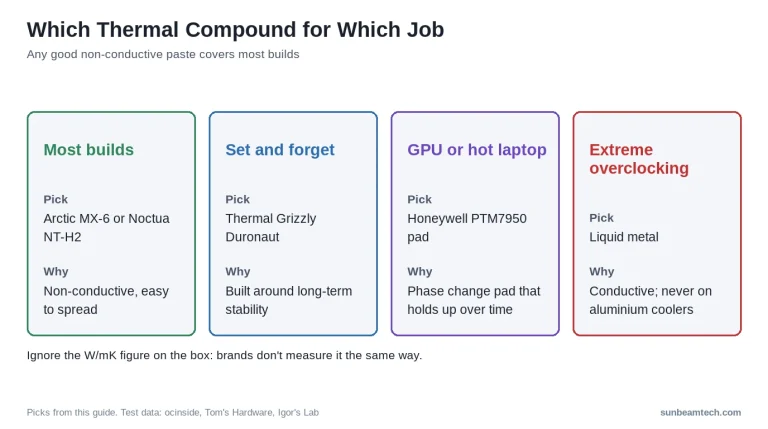
The paste you choose is worth about a degree. The paste you replace can be worth twenty. This guide separates the two, using measurements rather than the numbers printed on the box. Last updated: October 2026 The Short Answer For almost every build, buy a well-reviewed non-conductive paste and stop thinking about it. Noctua NT-H2,…

Cleaning a PC dust filter means removing the mesh or foam intake screen from your case, dislodging trapped dust, and reinstalling it fully dry to restore airflow. Last updated: September 2026 Quick Answer: How Do You Clean a PC Dust Filter? Remove the filter from your case, take it outside or over a trash bin,…

A PC magnetic dust filter is a removable mesh panel framed with flexible magnets that attaches directly to a PC case’s steel intake vents without screws or tools, capturing airborne particles before they reach fans, heatsinks, and GPU coolers. Last updated: August 2026 Quick Answer: What Is a PC Dust Filter Magnetic Type and Do…

A PC dust filter is a fine mesh screen placed over a computer case’s air intake vents to block airborne particles, dust, pet hair, and debris, from entering and accumulating on internal components. Last updated: July 2026 Quick Answer: Do You Actually Need a PC Dust Filter? Yes, most users benefit from having a dust…
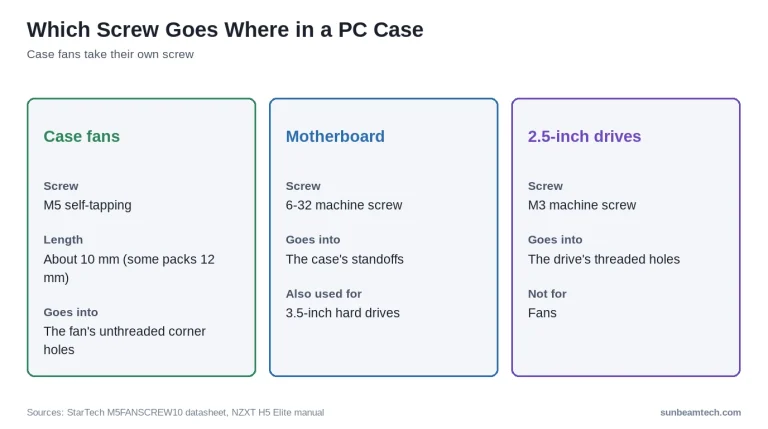
Case fan screws are self-tapping M5 screws, usually about 10mm long, that cut their own thread into the unthreaded corner holes of a PC case fan’s plastic frame. Last updated: October 2026 Quick Answer: What Size Screws Do Case Fans Use? Most PC case fans mount with M5 self-tapping screws, about 10mm long (some packs…

An 80mm case fan is a compact PC cooling fan measuring 80 × 80 × 25mm, used in small-form-factor builds, legacy ATX cases, PSU replacements, and server chassis, delivering 20–55 CFM airflow. Last updated: July 2026 Quick Answer: What Is an 80mm Case Fan? An 80mm case fan fits a frame exactly 80 millimeters across…

PC case fan sizes are standardized millimeter measurements, from 80mm to 200mm, that determine which fans fit your case’s mounting slots. Last updated: July 2026 Quick Answer: What Are the Standard PC Case Fan Sizes? PC case fans come in five standard sizes: 80mm, 92mm, 120mm, 140mm, and 200mm. The two you’ll encounter in almost…

Case fan direction is the orientation a PC fan is installed in, either drawing cool air into the case (intake) or pushing hot air out (exhaust). Last updated: July 2026 Quick Answer: What Direction Should Case Fans Face? Front and bottom fans should face inward as intake, pulling cool air into the case. Rear and…

A PC airflow diagram is a visual map showing the direction air moves through a computer case, identifying which fans act as intake and which act as exhaust. Last updated: July 2026 Quick Answer: What Is a PC Airflow Diagram? A PC case airflow diagram uses colored arrows (blue for intake, red for exhaust) to…
Independent PC hardware guides on BIOS settings, cooling, motherboard headers and troubleshooting, checked against manufacturer documentation.